Ethereum 地址如何领取代币
本指南介绍当你的 Ethereum 地址在受益人名单时如何领取代币。需提供一个 Substrate 地址作为接收地址。领取免手续费,通过提交带有效以太坊签名的未签名交易完成。
Prerequisites
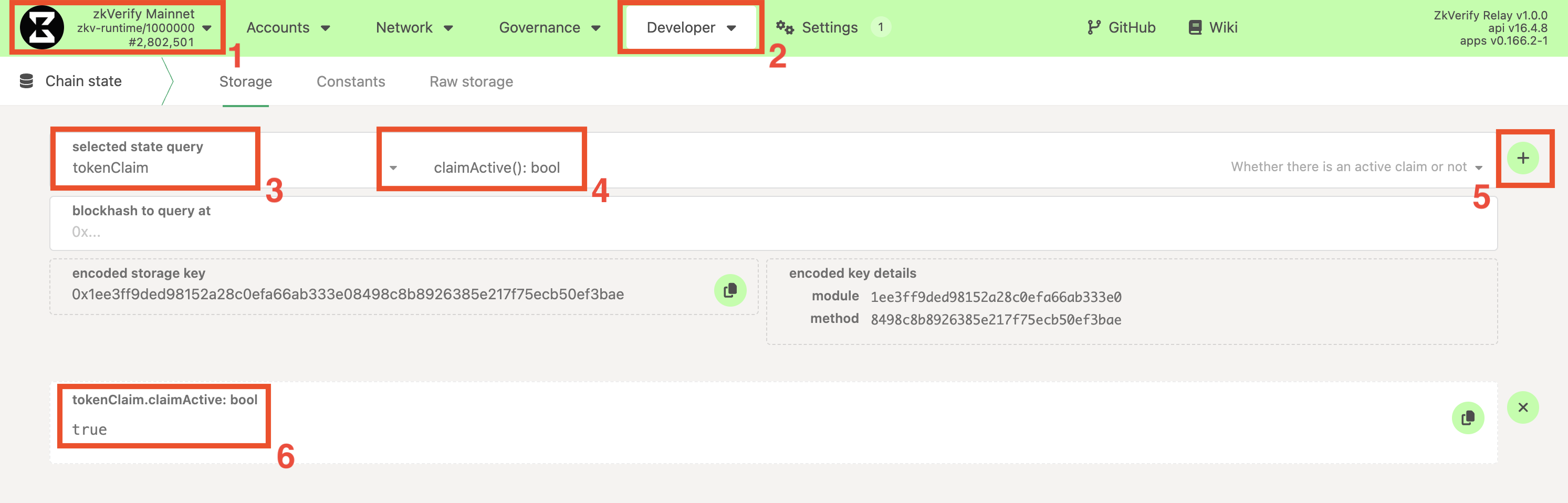
- Claim is active: The claim has been officially initiated. You can check this in the following way:
- Navigate to the PolkadotJS Apps interface for our chain.
- Navigate to Developer > Chain state tab.
- Select the
tokenClaimmodule and theclaimActive: boolmethod. - Click on the
+button on the right. If the claim has startedtruewill be returned,falseotherwise.
-
以太坊钱包: 你能访问符合条件的以太坊钱包(如 MetaMask)。
-
Substrate 账户: 用于接收代币,如无请参考 指南。
-
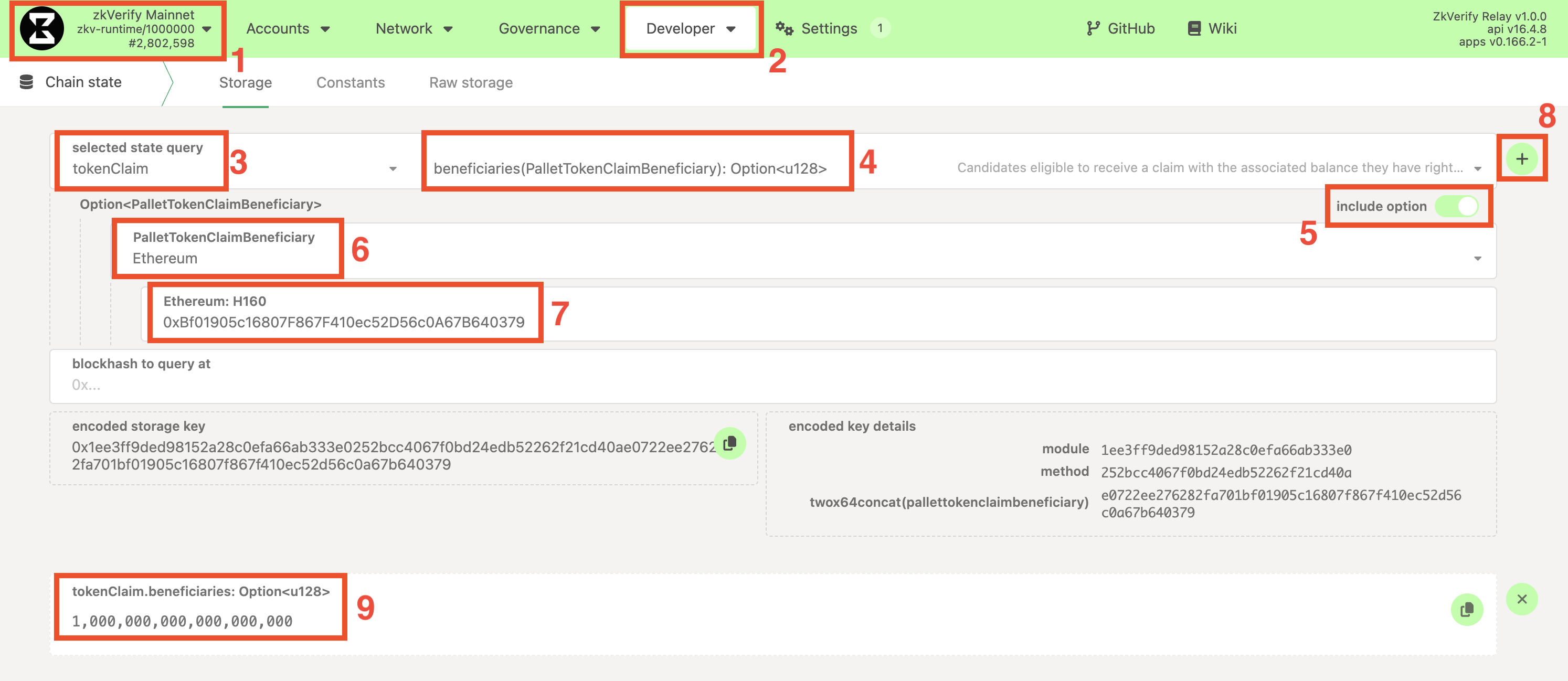
资格检查: 确认以太坊地址在当前受益人名单,可通过以下方式:
- Navigate to the PolkadotJS Apps interface for our chain.
- Navigate to Developer > Chain state tab.
- Select the
tokenClaimmodule and thebeneficiaries(PalletTokenClaimBeneficiary): Option<u128>method. Make sure also to check theinclude optionbutton on the right. - From the new fields that show up, set:
PalletTokenClaimBeneficiarytoEthereumEthereum: H160to your Ethereum address.- Leave the
blockhash to query atfield empty.
- Click on the
+button on the right. If you are eligible, you should see returned the amount you are entitled to (with 18 decimals), otherwise<none>will be returned.
- 官方领取消息: 活动开始时官方会公布唯一“领取消息”,需严格使用该字符串。可在链上获取:
- Navigate to the PolkadotJS Apps interface for our chain.
- Navigate to Developer > Chain state tab.
- Select the
tokenClaimmodule and theclaimId: Option<(u64, Bytes)>method. - Click on the
+button on the right. A number and a message will be returned between square brackets[]. Copy only the message.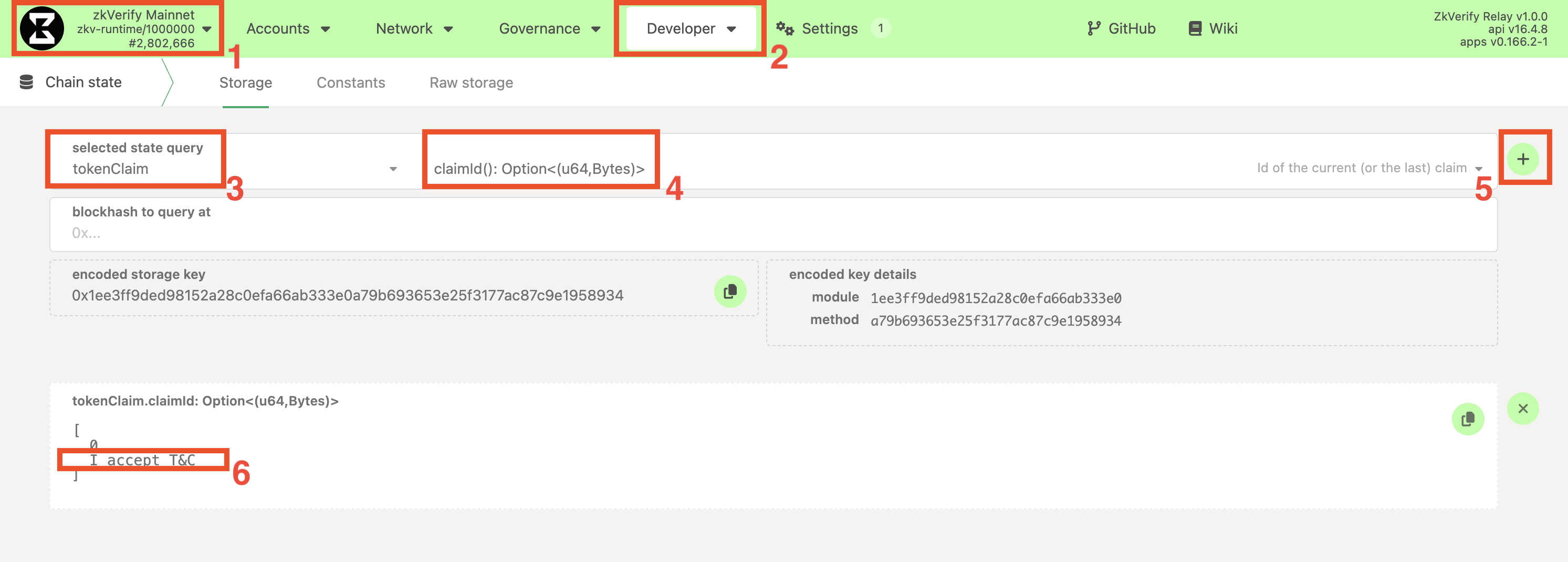
第一步:构造签名消息
需签名包含领取消息与目标 Substrate 地址的字符串:
格式:[claiming_message]@[destination_address]
Example:
- Claiming Message:
claim_round_1 - Destination Address:
ZKXEFgKUrjavy6PEBPrqwNY6svCkz72ttwP77JApnjXKWNVb6
The final message you need to sign is:
claim_round_1@ZKXEFgKUrjavy6PEBPrqwNY6svCkz72ttwP77JApnjXKWNVb6
注意
务必严格按格式,无空格/换行等多余字符。
第二步:生成以太坊签名
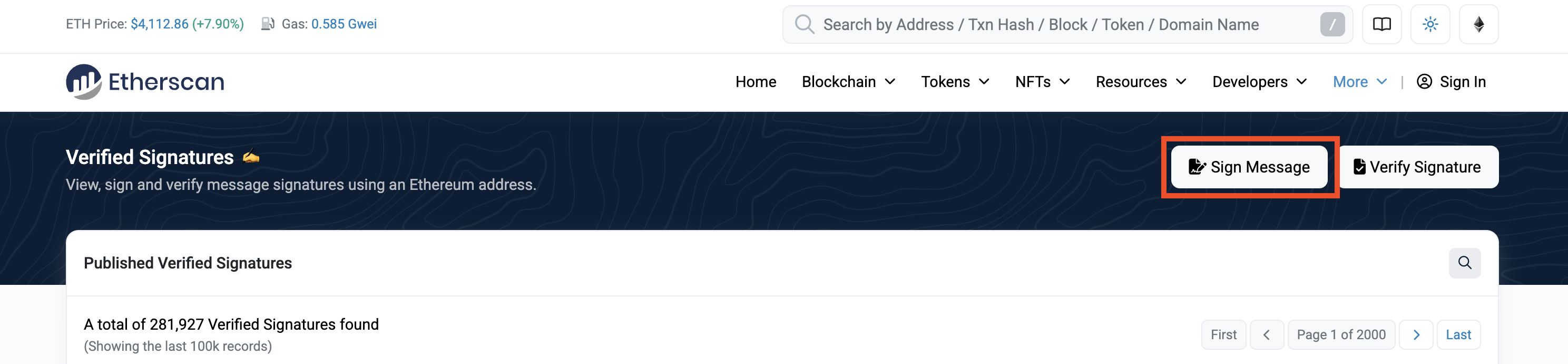
用符合条件的以太坊账户签名步骤一的消息,可使用 Etherscan 签名工具。
Using Etherscan:
- Go to the Etherscan's Verified Signature tool.
备注
多数 _scan 浏览器(如 Basescan)也提供该工具。
- Click on
Sign Messageand connect the Ethereum Wallet and the corresponding eligible Ethereum account. - In the
Messagebox, paste the full constructed message from Step 1.
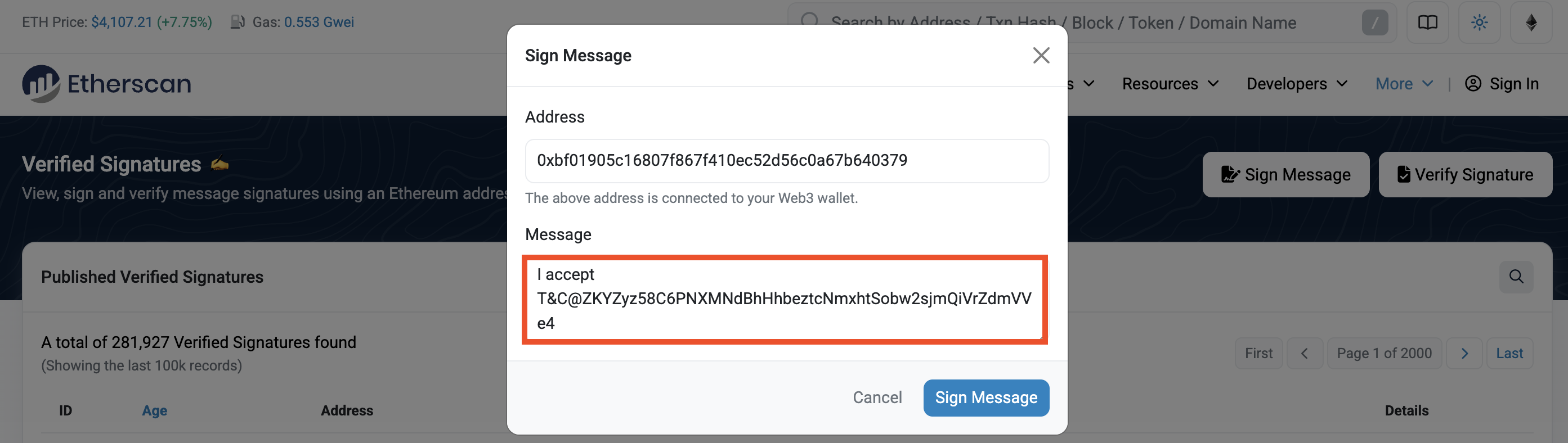
注意
务必与步骤一的消息完全一致,无空格/换行等。最安全方式是在 Etherscan Message 框直接输入。
- Click
Sign Message. Your wallet will prompt you a confirmation to sign the message. - After signing, copy the value of the
Signature Hashfield. This is the Ethereum signature you're going to use for claiming on zkVerify, and it will start with0x....
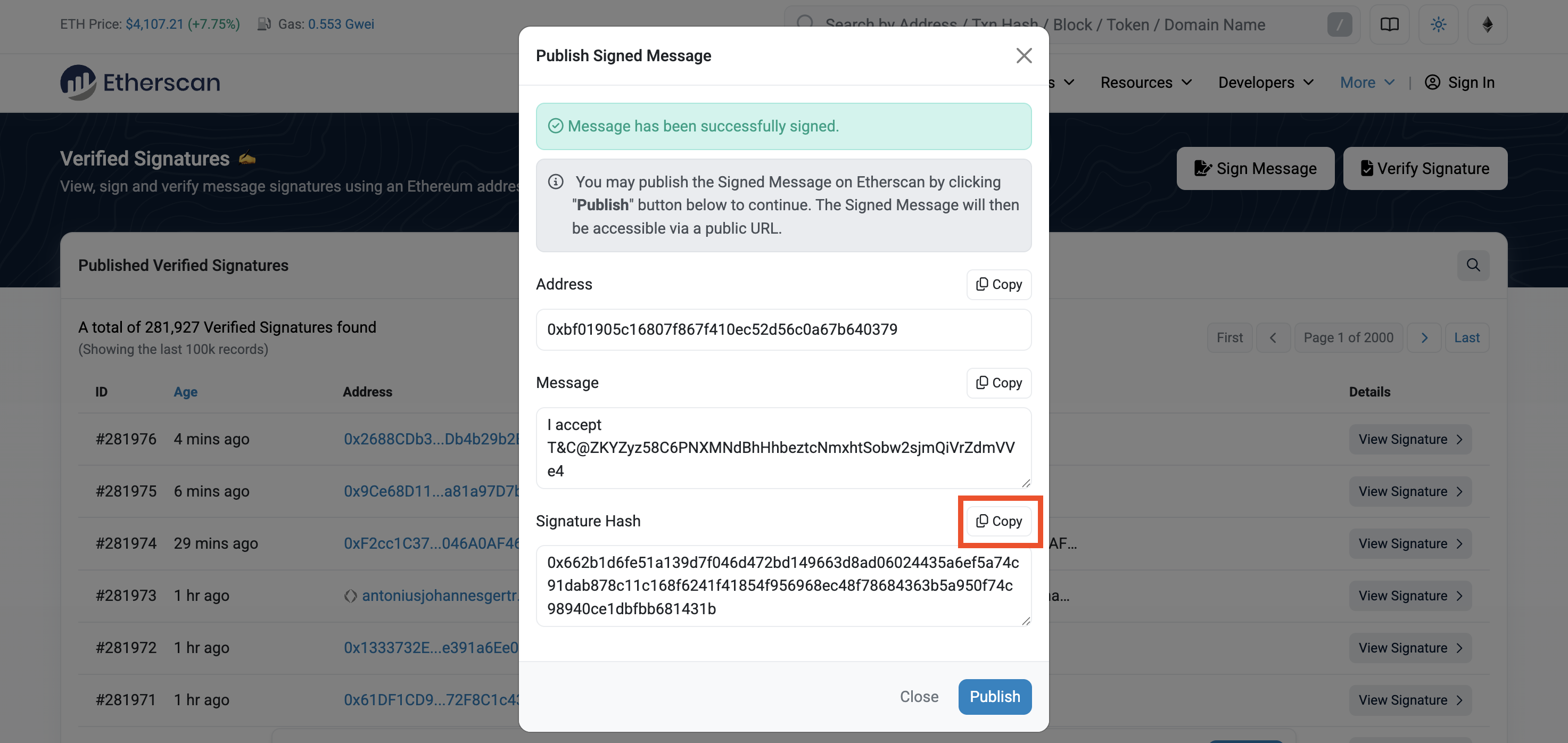
注意
仅用官方/可信工具签名,需符合 EIP-191 格式,手动拼签名可能导致领取失败。
第三步:提交领取交易
获得签名后,以未签名 extrinsic 提交:
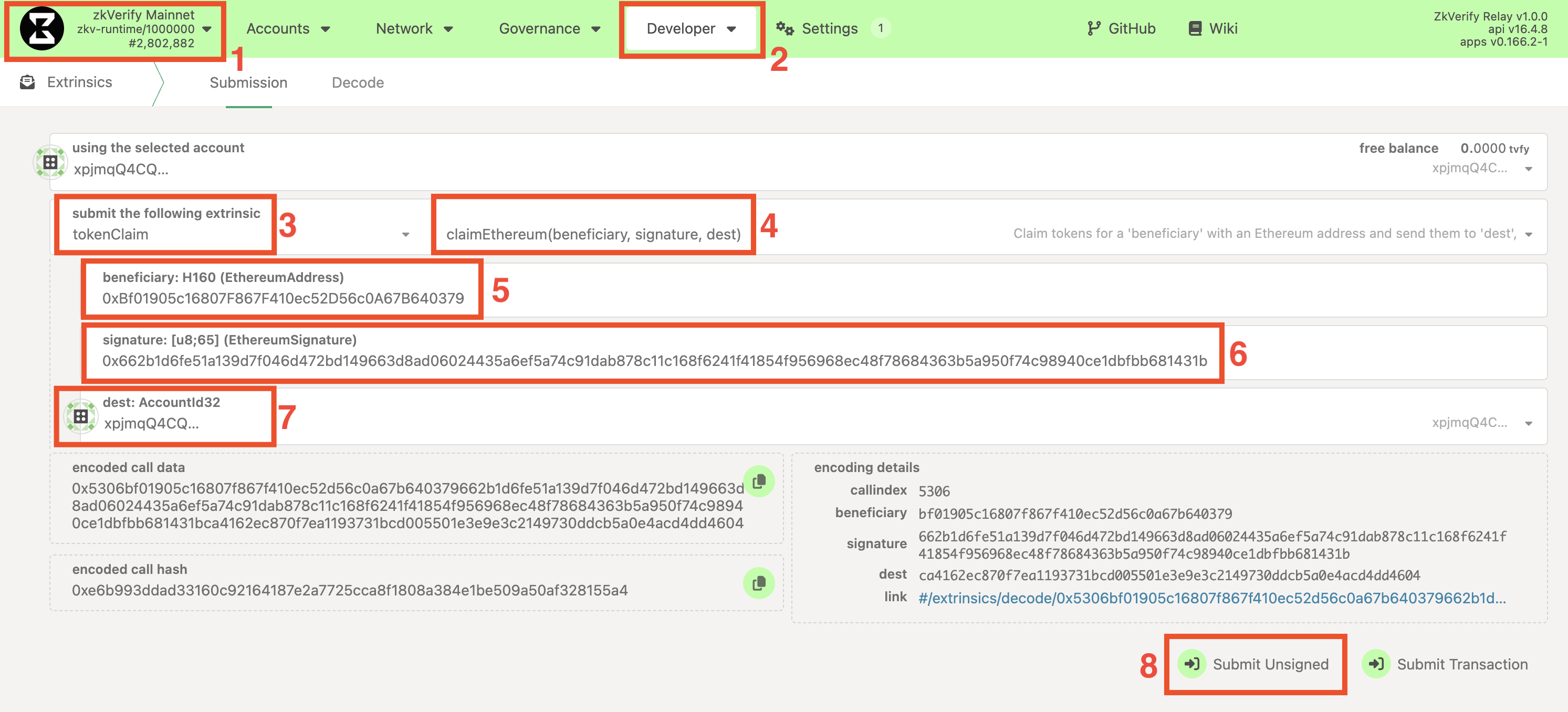
- On the PolkadotJS Apps interface, navigate to Developer > Extrinsics.
- Select the
tokenClaimmodule from the first dropdown and theclaimEthereum(beneficiary, signature, dest)method in the second dropdown. - For the
beneficiary: H160 (EthereumAddress)field, paste your Ethereum Address - For the
signature: [u8;65] (EthereumSignature)field, paste the signature you copied in Step 2. - For the
dest: AccountId32field, insert the Substrate address on which you want to receive the tokens (e.g.ZKY..,xpi..). - Click the "Submit Unsigned" button and the Submit (no signature) button in the new window that will appear.
第四步:验证领取
签名与地址有效时,交易处理并显示绿色 ExtrinsicSuccess。可在 Accounts 查看目标 Substrate 账户余额,或确认以太坊地址已不在受益人列表。
故障排查
若失败,会显示红色提示及 InvalidTransaction,可能原因:
Transaction is outdated: 提交时无活动领取。Invalid signing address: 领取的以太坊地址不在名单。Transaction has a bad signature: 签名验证失败,可能消息错误或签名非预期地址。