Substrate 地址如何领取代币
本指南介绍当你的 Substrate 地址在受益人名单时如何领取代币。
领取是免手续费的,通过提交带有效签名的 tokenClaim 未签名交易完成。
Prerequisites
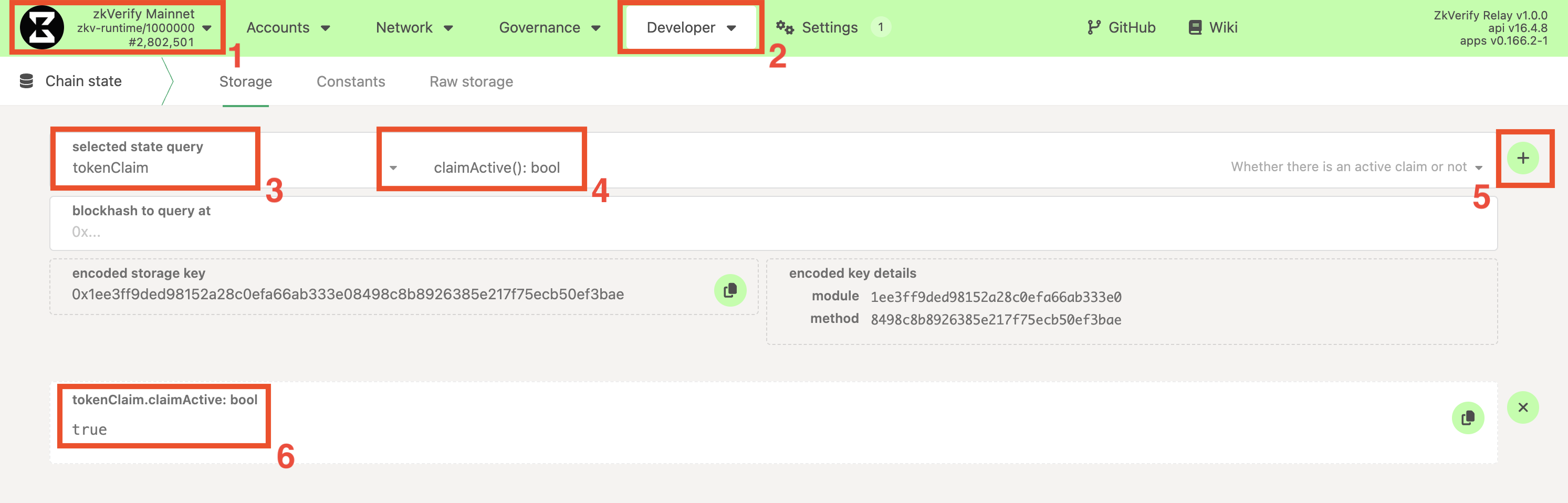
- Claim is active: The claim has been officially initiated. You can check this in the following way:
- Navigate to the PolkadotJS Apps interface for our chain.
- Navigate to Developer > Chain state tab.
- Select the
tokenClaimmodule and theclaimActive: boolmethod. - Click on the
+button on the right. If the claim has startedtruewill be returned,falseotherwise.
-
账户访问权限: 你能访问受益人列表中的 Substrate 账户。
-
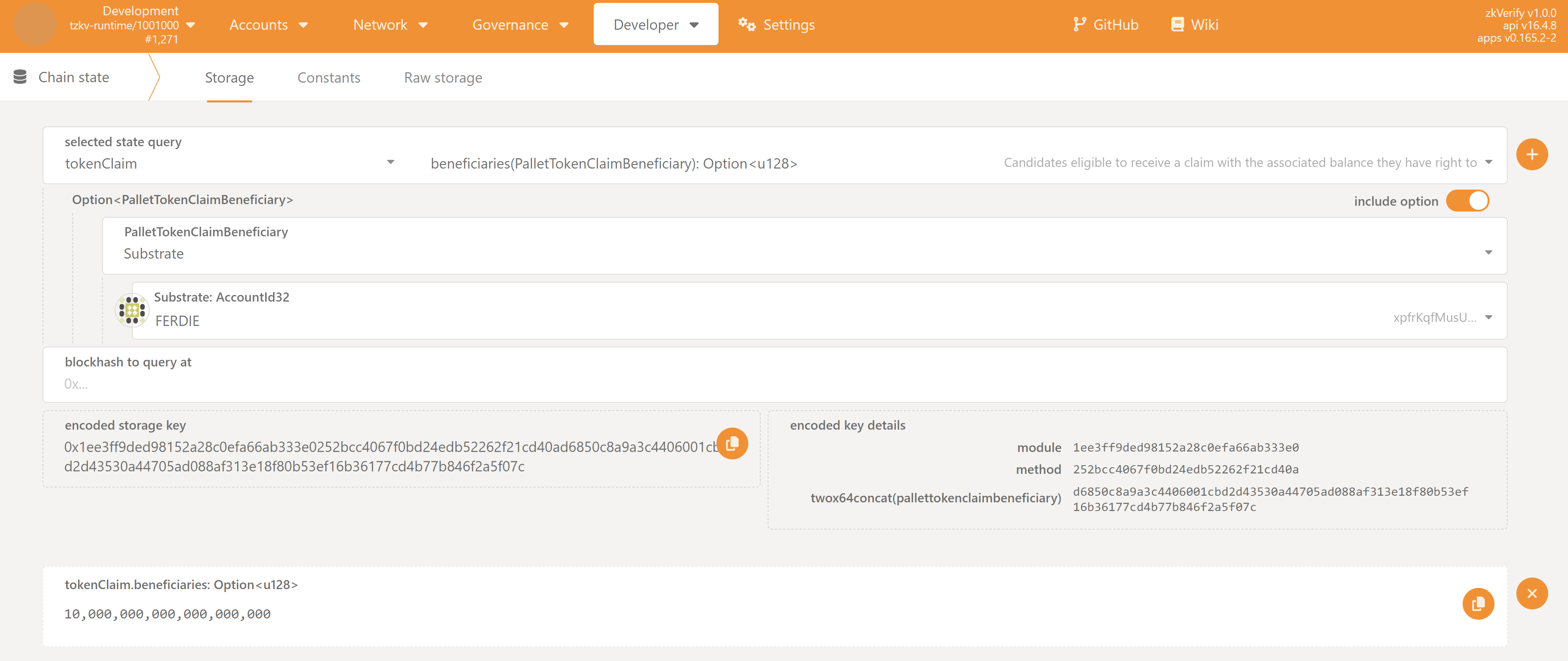
资格检查: 确认你的 Substrate 地址在当前赠送的受益人列表,可通过以下方式:
- Navigate to the PolkadotJS Apps interface for our chain.
- Navigate to Developer > Chain state tab.
- Select the
tokenClaimmodule and thebeneficiaries(PalletTokenClaimBeneficiary): Option<u128>method. Make sure also to check theinclude optionbutton on the right. - From the new fields that show up, set:
PalletTokenClaimBeneficiarytoSubstrateSubstrate: AccountId32to your Substrate address.- Leave the
blockhash to query atfield empty
- Click on the
+button on the right. If you are eligible, you should see returned the amount you are entitled to (with 18 decimals), otherwise<none>will be returned.
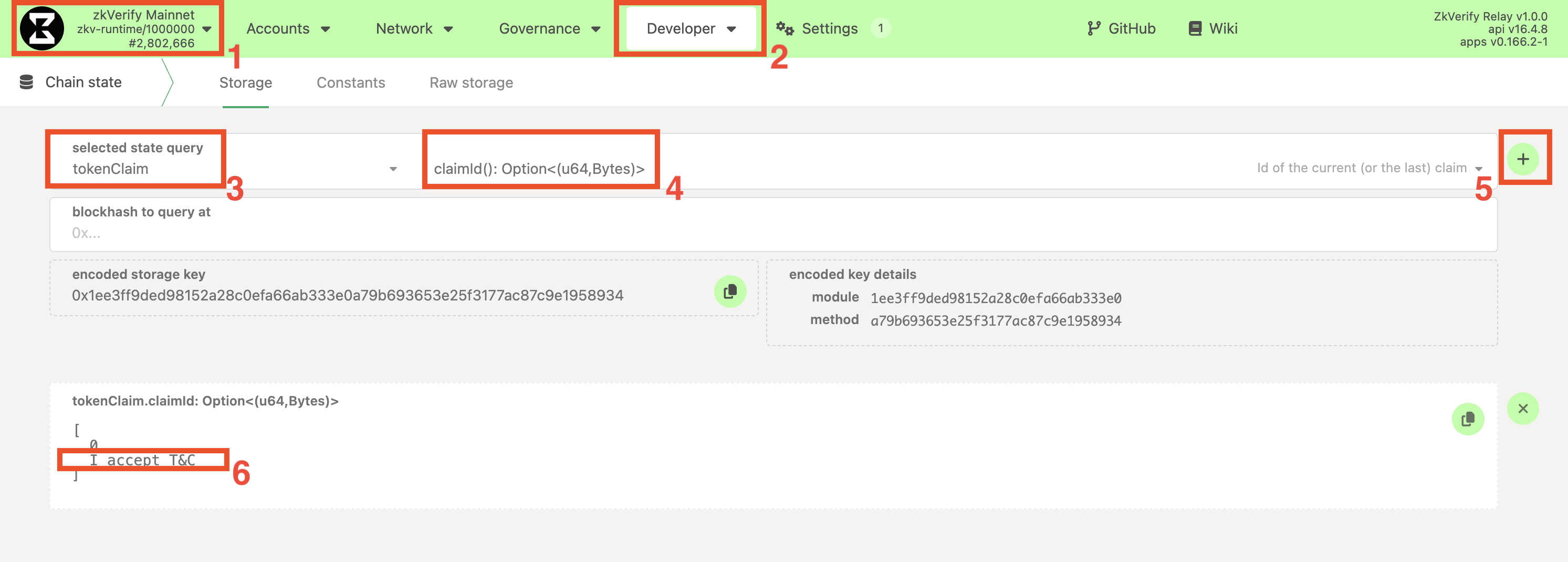
- 官方领取消息: 活动开始时官方会公布唯一的“领取消息”,需严格使用该字符串。可在链上获取:
- Navigate to the PolkadotJS Apps interface for our chain.
- Navigate to Developer > Chain state tab.
- Select the
tokenClaimmodule and theclaimId: Option<(u64, Bytes)>method. - Click on the
+button on the right. A number and a string will be returned. The message to be signed for this claim is the string, and you might want to copy it.
第一步:生成签名
假设消息为 claim_round_1。需用符合条件的 Substrate 账户签名此消息以证明所有权。推荐使用 PolkadotJS。
- Recommended: PolkadotJS Apps UI
- Advanced: Subkey CLI
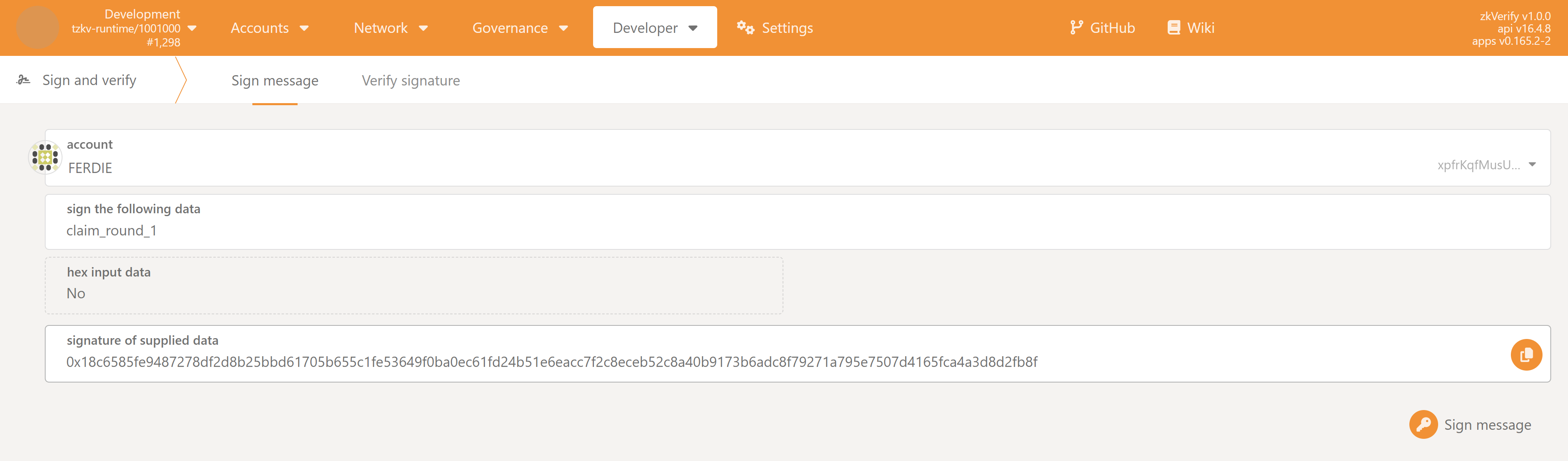
- 打开 PolkadotJS,进入 Developer > Sign and Verify。
- 选择受益人账户。
- 在
sign the following data粘贴步骤 1 的原始官方消息。 - 点击 Sign message,钱包弹窗确认。
- 签完后在
signature of supplied data显示以0x开头的长签名,复制备用。
若熟悉命令行,可用 subkey:
This method involves using your mnemonic phrase (seed phrase). Never expose your seed phrase in an insecure environment.
终端运行,替换占位符:
subkey sign --message "claim_round_1" --suri "your twelve or twenty four word seed phrase" --scheme "sr25519/ed25519/ecdsa"
输出即签名哈希(0x 开头),复制保存。
第二步:提交领取交易
获得签名后,以未签名交易提交:
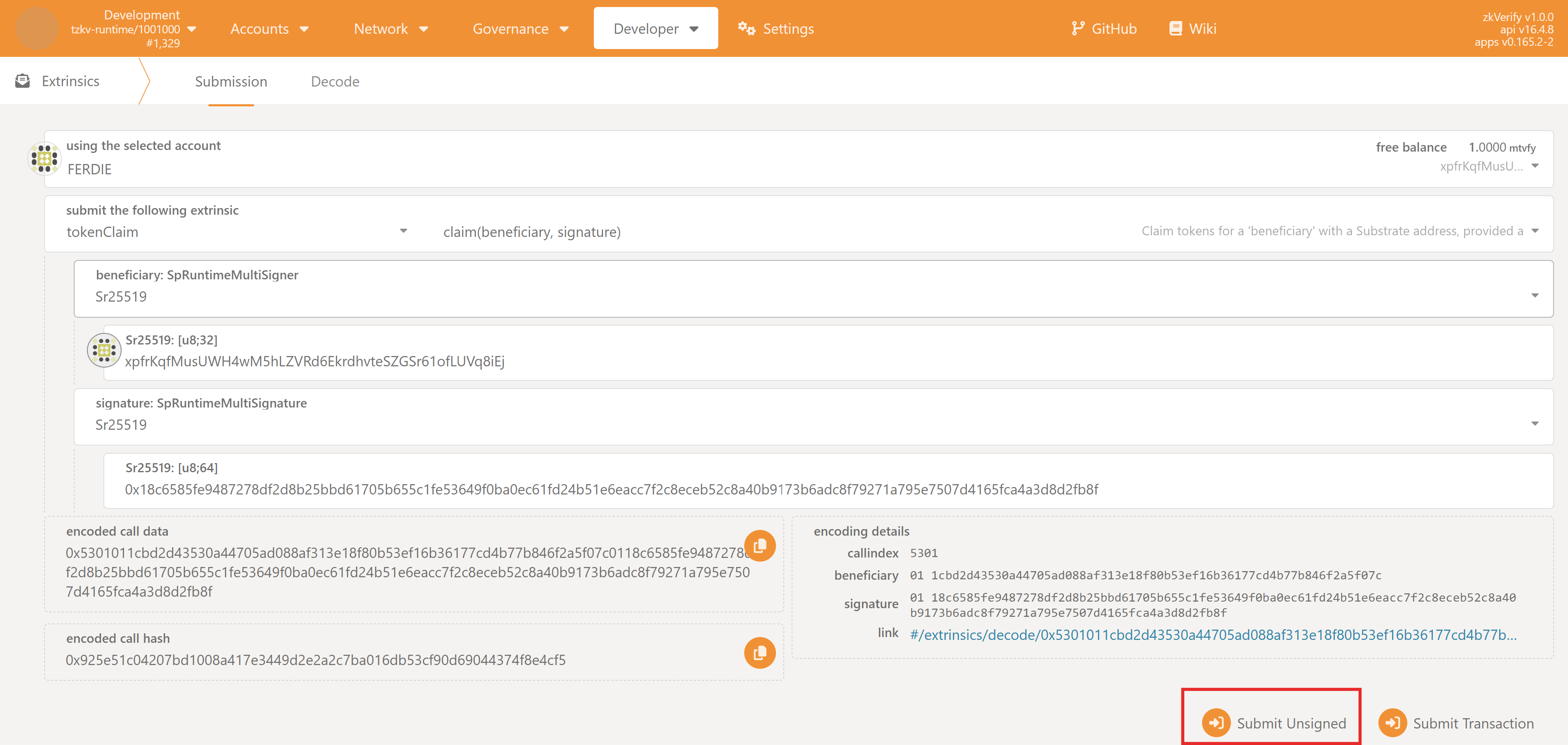
- On the PolkadotJS Apps interface, navigate to Developer > Extrinsics.
- Select the
tokenClaimmodule from the first dropdown and theclaim(beneficiary, signature)method in the second dropdown.
由于提交未签名交易,using the selected account 选择任意账户即可。
Now, depending on your account type:
- Typical Flow (sr25519 scheme)
- Advanced (ed25519 scheme)
- Advanced (ecdsa scheme)
若使用 sr25519 账户(如 Talisman、Subwallet 等):
beneficiary: SpRuntimeMultiSigner选Sr25519,在Sr25519: [u8;32]填你的地址(ZKY..、xpi..等)signature: SpRuntimeMultiSignature选Sr25519,在Sr25519: [u8;64]粘贴步骤一的签名。
若使用 ed25519 账户:
beneficiary选Ed25519,Ed25519: [u8;32]填地址signature选Ed25519,Ed25519: [u8;64]粘贴签名。
若使用 ecdsa 账户:
beneficiary选Ecdsa,Ecdsa: [u8;33]填压缩公钥 hex(如0x3..)。可用subkey获取:
复制输出的subkey inspect "<Your seed Phrase>" --scheme ecdsaPublic key(hex)。signature选Ecdsa,Ecdsa: [u8;65]粘贴步骤一生成的签名。PolkadotJSSign & Verify可为 ECDSA 账户生成签名,推荐用Subkey。
- Click the "Submit Unsigned" button and the Submit (no signature) button in the new window that will appear.
高级提示:若不使用 PolkadotJS 前端,beneficiary: SpRuntimeMultiSigner 实际需 hex 公钥。前端会自动转换 sr25519/ed25519 地址,但 ecdsa 需手动传 hex 公钥(可用 subkey 或 PolkadotJS 的 Convert address 工具获取)。
第三步:验证领取
签名与账户有效时,交易会处理并显示绿色 ExtrinsicSuccess。可在 Accounts 查看余额,或确认地址已不在受益人列表。
故障排查
若失败,会显示红色提示及 InvalidTransaction 信息,可能原因:
Transaction is outdated: 提交时没有活动的 claim。Invalid signing address: 领取的地址不在受益人名单。Transaction has a bad signature: 签名验证失败,可能消息不对或签名非预期地址。