运行新验证人节点
Who are Validators ?
zkVerify 基于 Substrate,采用 NPoS 共识,包含两类角色:Validator 与 Nominator。
- Validator 运行验证节点参与出块并获得奖励。
- Nominator 将质押委托给可信验证人,获得部分奖励,无需运行软件。
Steps Involved
- 启动验证节点
- 在网络注册
- 质押 tVFY
- 开始验证
Bootstrapping the validator node
我们提供了启动验证节点的脚本,按此 教程 安装依赖后,运行:
cd compose-zkverify-simplifiedscripts/init.sh
脚本会询问节点信息,按以下选择:
- Node Type:Validator
- Network:Testnet
- Node Name:自定义
- Node Key:让脚本随机生成
- Secret Phrase:导入或新建(建议新建以区分)
At the end of the session the script will populate directory deployments/validator-node/network with the proper files and you will get the following message:
=== Run the compose project with the following command:========================docker compose -f /home/your_user/compose-zkverify-simplified/deployments/validator-node/testnet/docker-compose.yml up -d========================
运行提示的命令启动验证节点:
docker compose -f /home/your_user/compose-zkverify-simplified/deployments/validator-node/testnet/docker-compose.yml up -d
检查容器是否运行:
docker ls
输出示例:
CONTAINER ID IMAGE COMMAND CREATED STATUS NAMESca4bdf2c6f05 zkverify/relay-node:latest "/app/entrypoint.sh" About a minute ago Up About a minute validator-node
Register your node with the network
本节介绍在链上注册验证人,仅需一次。提交若干 extrinsic 后,节点可出块并通过质押获得奖励。需提供 5 个公钥:Babe、Para Validator、Para Assignment、Authority Discovery、Grandpa。Grandpa 用 ed25519,其余用 sr25519。
提交会更改链状态,需在与助记词关联的账户中准备足够资金支付手续费。
生成 Babe/Para Validator/Para Assignment/Authority Discovery:
docker run --rm -ti --entrypoint zkv-relay zkverify/relay-node:latest key inspect --scheme sr25519
and provide your validator secret phrase when prompted for (URI:), then hit enter. You should get the following response:
Secret phrase: demise trumpet minor soup worth airport minor height sauce legend flag timberNetwork ID: substrateSecret seed: 0x9b6a3ec8063e64e9d896ed8dbcd895d7fd0d7a3a982ed9b6839e2b55c49b9e15Public key (hex): 0xc0c07abce7879c09231fcbd07165cfaabc4a634636850578a914b08b87cf9914Account ID: 0xc0c07abce7879c09231fcbd07165cfaabc4a634636850578a914b08b87cf9914Public key (SS58): 5GRSEFpxJ8rU4LLiGrsnvkk7s1hdJXFZzx1T41KhECzTn7otSS58 Address: 5GRSEFpxJ8rU4LLiGrsnvkk7s1hdJXFZzx1T41KhECzTn7ot
取 Public key (hex)。再用 ed25519 生成 Grandpa:
docker run --rm -ti --entrypoint zkv-relay zkverify/relay-node:latest key inspect --scheme ed25519
and provide same secret phrase when prompted for (URI:), then hit enter. You should get the following response:
Secret phrase: demise trumpet minor soup worth airport minor height sauce legend flag timberNetwork ID: substrateSecret seed: 0x9b6a3ec8063e64e9d896ed8dbcd895d7fd0d7a3a982ed9b6839e2b55c49b9e15Public key (hex): 0x0dbccabf681188116e642c1dbc9332a2bbec7fbef1792196879a3cba6c52464bAccount ID: 0x0dbccabf681188116e642c1dbc9332a2bbec7fbef1792196879a3cba6c52464bPublic key (SS58): 5CNiZaphDhE8gT7cCDNZrXkd6vFfsuPjNQqdS8eEEw8mroHpSS58 Address: 5CNiZaphDhE8gT7cCDNZrXkd6vFfsuPjNQqdS8eEEw8mroHp
Public key (hex) 即 Grandpa。获取三类公钥后,访问 PolkadotJS,调用 sessions 模块的 setKeys extrinsic。
keys 字段填入 Babe + Grandpa(去掉 0x)+ 其余键(去掉 0x),例如:
0xc0c07abce7879c09231fcbd07165cfaabc4a634636850578a914b08b87cf99140dbccabf681188116e642c1dbc9332a2bbec7fbef1792196879a3cba6c52464bc0c07abce7879c09231fcbd07165cfaabc4a634636850578a914b08b87cf9914c0c07abce7879c09231fcbd07165cfaabc4a634636850578a914b08b87cf9914c0c07abce7879c09231fcbd07165cfaabc4a634636850578a914b08b87cf9914
proof 字段设为 0x,提交并签名:
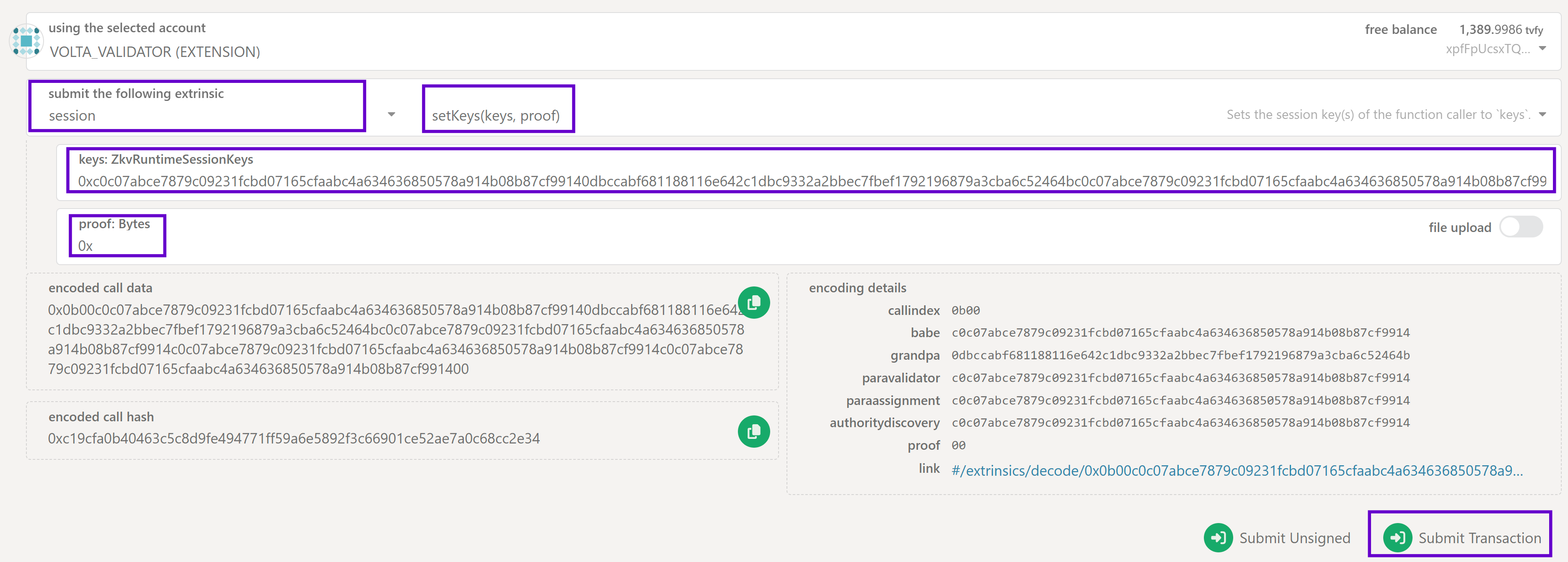
数秒后应弹出绿色提示确认提交成功。
Staking tVFY
接下来为验证节点质押 tVFY。
目前最小质押 10000 tVFY。可在 Developer -> Chain State -> staking state query -> minValidatorBond 查看。
在 PolkadotJS 查看当前 era 活跃验证人:Developers > ChainState > staking,先查 currentEra,再用 eraStakersOverview 输入该 era,获取活跃验证人信息。
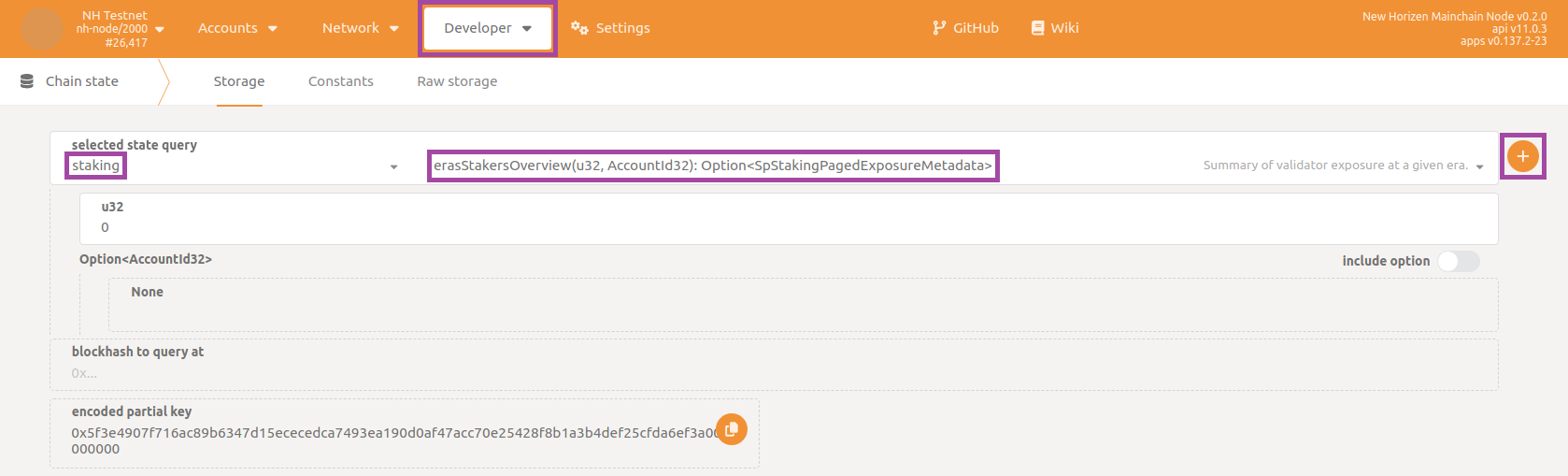
The response you get should have a payload similar to this:
[[[05ETuZEyLnfVzQCaDM8aQCcsNnz6xjPKvQCtqynCLqwng8QLd]{total: 279,999,999,999,999,999,995,132,984own: 279,999,999,999,999,999,995,132,984nominatorCount: 0pageCount: 0}][[05D29UEzgStCBTnjKNdkurDNvd3FHePHgTkPEUvjXYvg3brJj]{total: 279,999,999,999,999,999,995,132,984own: 279,999,999,999,999,999,995,132,984nominatorCount: 0pageCount: 0}][[05DiMVAp8WmFyWAwaTwAr7sU4K3brXcgNCBDbHoBWj3M46PiP]{total: 139,999,999,999,999,999,971,572,664own: 139,999,999,999,999,999,971,572,664nominatorCount: 0pageCount: 0}]]
可查看每个验证人的地址、质押总额、提名等。示例中第三名质押 139,999,999,999,999,999,971,572,664(单位 tVFY*10^18),需至少质押此数(含被提名)以进入活跃集合。
更多质押说明见 指南。
请质押高于前 10 最低值。进入 Developer > Extrinsics,选择 staking 模块的 bond extrinsic,填写质押金额,选择 payee 账户并签名。
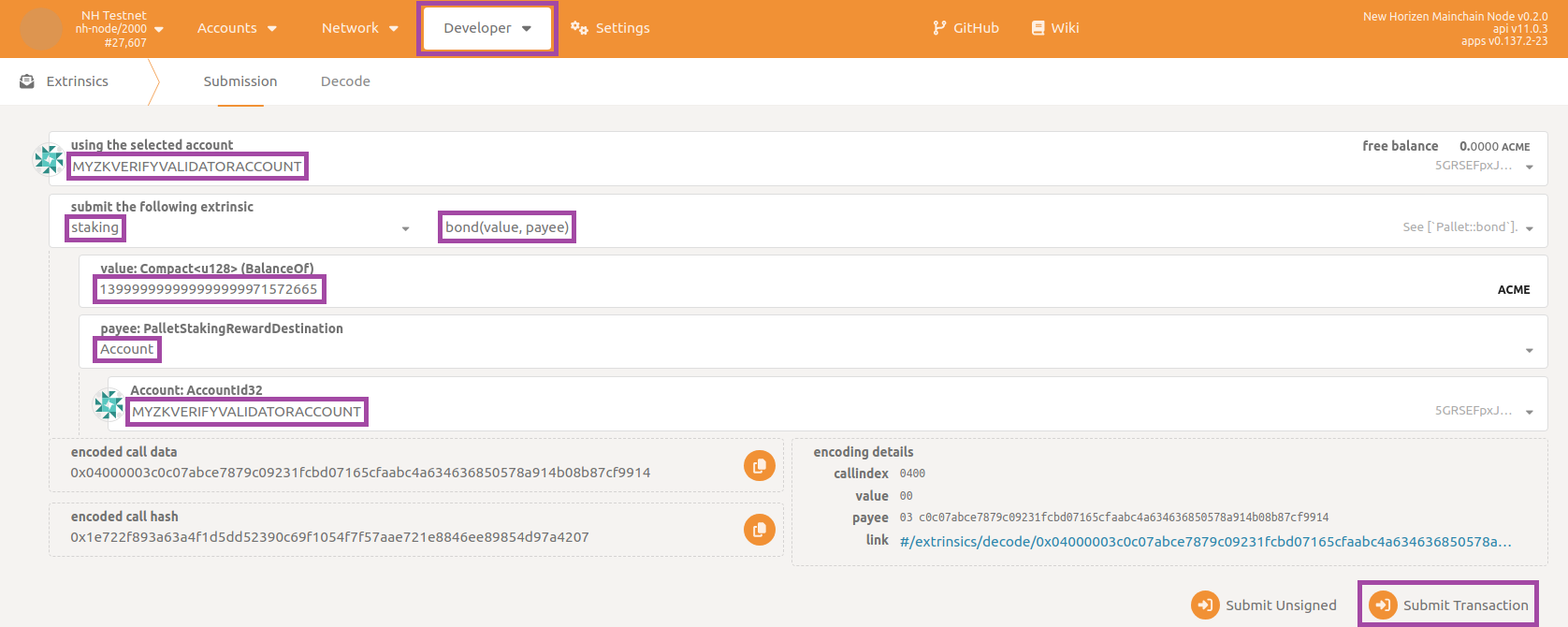
Start validating
质押完成后,执行 staking 模块的 validate(prefs) extrinsic,设置提名佣金(不确定可填 100000000),blocked 设为 no 并签名。
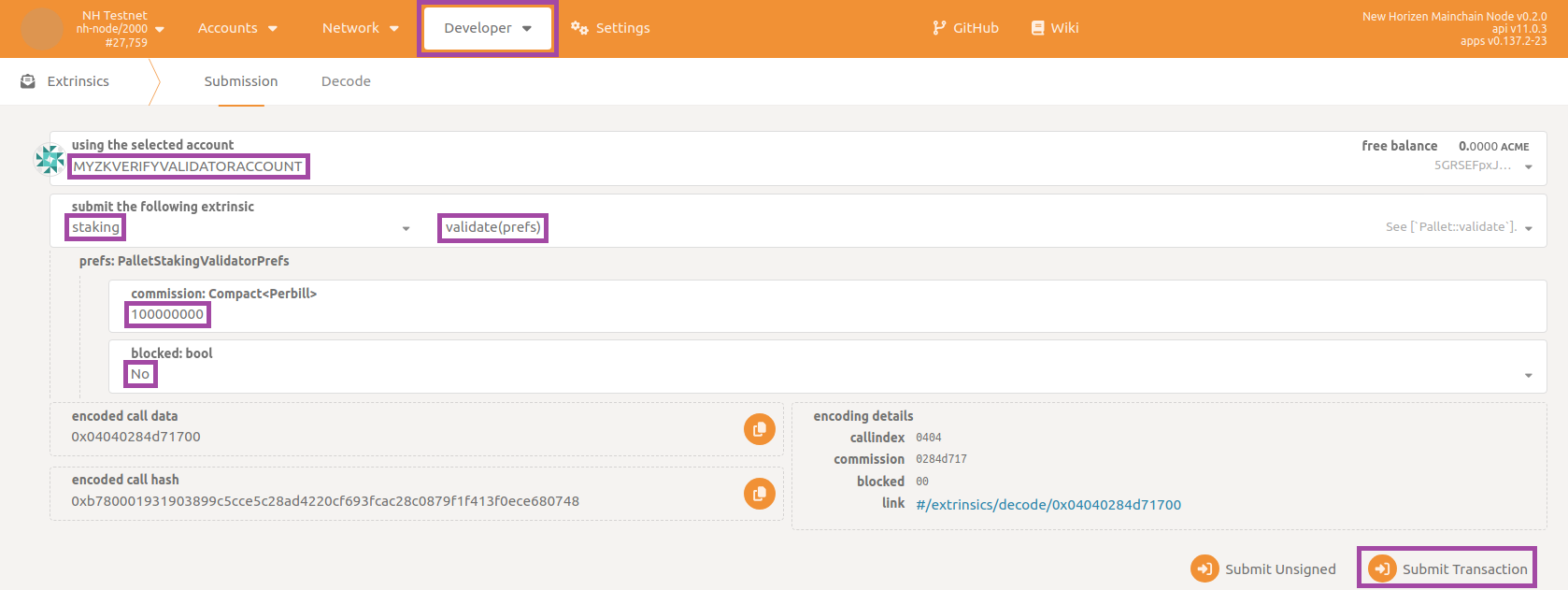
等待绿色提示确认提交。可在 Network -> Staking 的 Active 标签确认验证人已在列表。
Conclusion
完成!等待当前 era 结束再过一轮(每个 era 6 小时,最坏约 12 小时),节点便会出块。可在 Network -> Explorer 查看最新出块,或在 Network -> Staking 使用质押控制台。也可在 Docker 日志中看到类似下图的出块信息:

reporting your validator node is not only syncing the blockchain but also contributing by authoring new blocks (Starting consensus session... and Pre-sealed block for proposal...).
If you are interested in how to claim the new tokens you deserve as an active validator, navigate to the section Developer then to the subsection Extrinsics and select staking, payoutStakers. Remember to select your validator account as using the selected account, then choose your validator account as validatorStash: AccountId32 and insert target era in the textbox era: u32 (EraIndex). Finally click on Submit Transaction button:
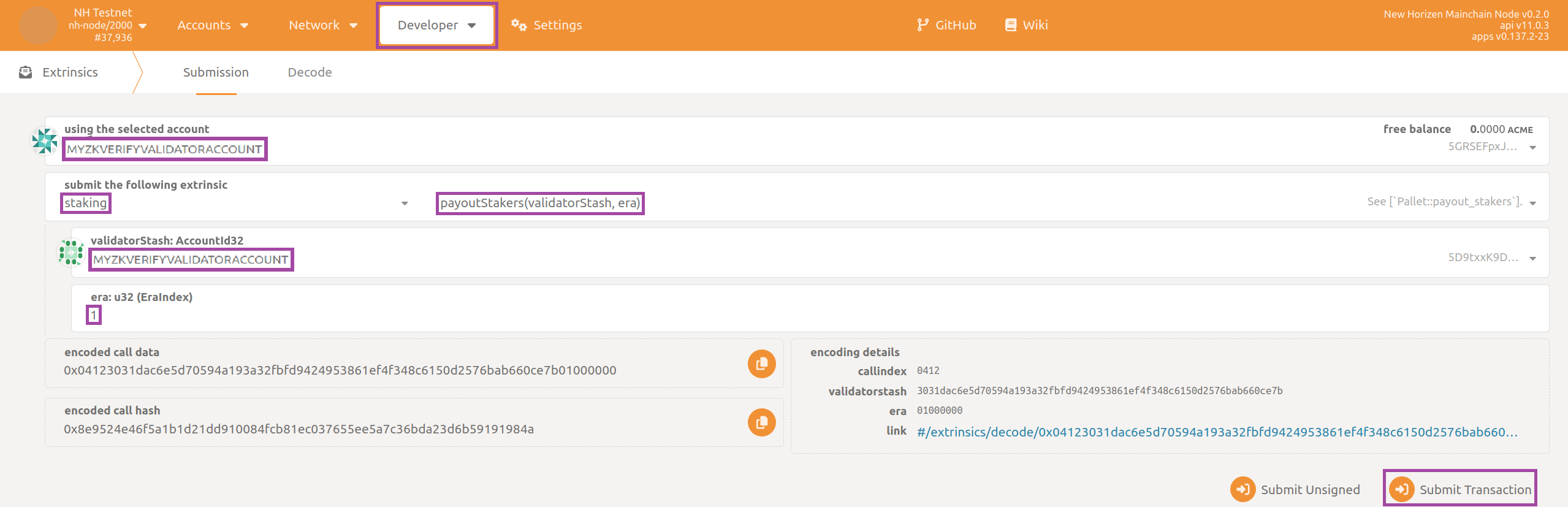
the era index being retrievable from section Developer then to the subsection Chain state, state staking, erasRewardPoints, then filtering with respect to your validator account.
You will want to periodically repeat this claim operation (even better to automate it in some way) as the blockchain progresses. You can only claim rewards for the previous 30 eras (approximately one week).